
Data on a matter
Information collected through a transaction can be saved back to a matter through the use of data markers.
These data markers are accessible in the following places on a matter:
- The data tab
- A stakeholder’s contact card
- A data collection task
The Data tab
Section titled “The Data tab”The Data tab of a matter contains the custom fields related to that transaction.
Custom fields allow you to collect and save matter specific information.
To view a custom field:
- Navigate to the D ata tab of a matter
- Use the search bar to find a custom field by a keyword
- Expand the group the custom field is saved under
- The custom field will be listed on the right hand side, formatted as: {{keyword.keyword}}
- The data will be saved on the left hand side
Some of these custom fields may also be pinned to the top left hand side of a matter:
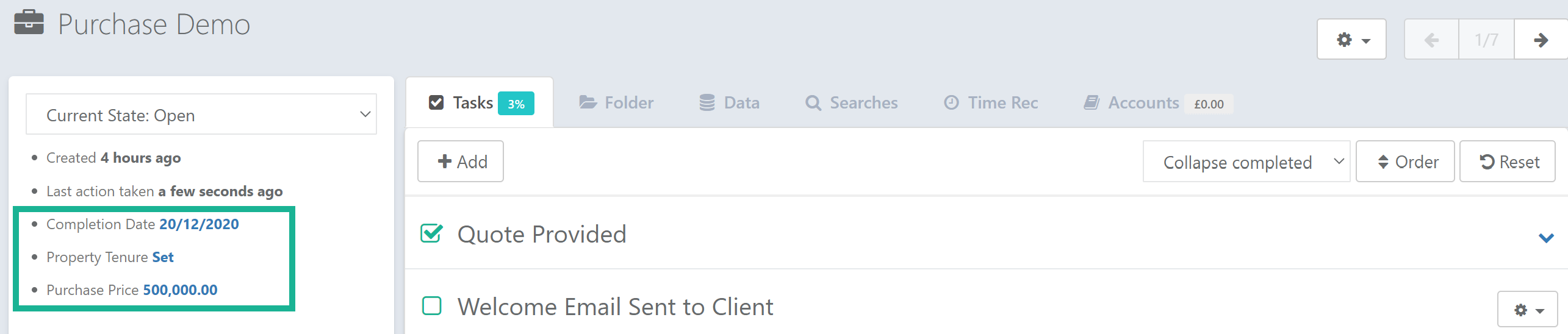
These fields will either show:
- A value, if data has been applied
- “Set”, if data is not yet available
To input new data, select the blue text field and you will be taken to the relevant custom field within the matter.
Stakeholder’s contact cards
Section titled “Stakeholder’s contact cards”A stakeholder’s contact card contains the contact fields related to that stakeholder.
Contact fields allow you to collect and save information about that stakeholder.
To view a contact field:
- Select Edit on the relevant stakeholder’s contact card
- Expand the group it’s saved under
- The contact field will be listed on the right hand side, formatted as: {{stakeholder.keyword.number.keyword}}
- The data will be saved on the left hand side
Data Collection Tasks
Section titled “Data Collection Tasks”A data collection task allows a user to add or modify information against a pre-defined matter or contact field.
Configuring a Data Collection Task
Section titled “Configuring a Data Collection Task”- Visit Settings > Matters
- Select the Workflow tab
- Create a new task or edit an existing one
- Select Data Collection from the type of tasks provided
- Provide the task with a name
- Edit Fields to choose the matter and/or contact fields that the user should be able to access
- Complete the remaining task settings as required
Using a Data Collection Task
Section titled “Using a Data Collection Task”- Within a matter, select the data collection task from the matter’s workflow
- Add or modify the data as required
- Confirm